The parent council of an international school in Barcelona organises shared lunches, workshops, meetings and outings for families who speak many different languages. Until now, all of it lived in WhatsApp groups, a few forms and people's heads.
The problem
Parents kept asking the same questions: what's coming up, how do I sign up, who is already coming? Organisers collected answers in chats and counted by hand. Anything written for parents had to exist in English and Spanish. And whatever we built had to protect parents' phone numbers, because a community page is not the place for a contact list.
There was no budget for a platform, and nobody wanted another account to log into.
What we built
A small set of static web pages, built on what the community already uses.
- The school's own calendar. The hub reads the school's public Google Calendar directly, so there is no second calendar to keep up to date. The calendar shows the next five months at a glance.
- Sign-ups where they make sense. Simple rules on the event title decide whether an event gets a sign-up form and which questions it asks. A shared lunch asks about food and dietary needs, a workshop asks who is coming, and a holiday or a Learner outing gets no button at all.
- One link per event. Organisers copy a sign-up link and paste it into the calendar entry or the group chat. It opens the hub at exactly that event with the form already open.
- Articles from Google Docs. Organisers write in a normal Google Doc. A script turns it into a page in both languages and only translates the parts that changed, so earlier corrections to the Spanish text are kept.
Keeping contact details private
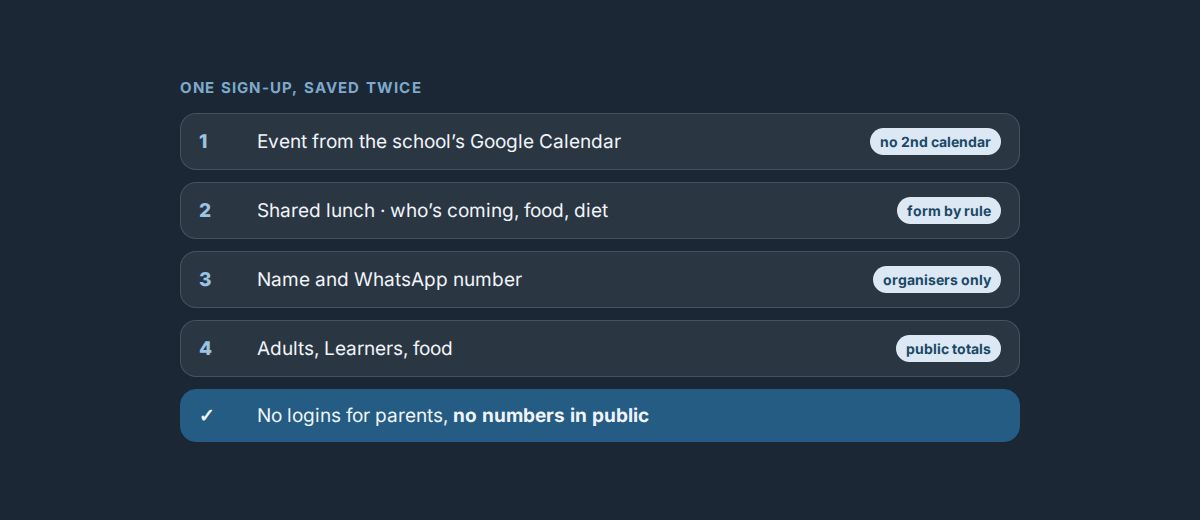
- Every sign-up is saved twice. The full record with name and WhatsApp number goes to a store only the organisers can read. A second record with only the counts (adults, Learners, food) is public and drives the totals on the calendar.
- Changing your answer just works. Each sign-up is identified by a fingerprint of the event and the phone number. If a parent signs up again, the newest answer counts, without anyone having to log in.
- The organiser view is members-only, and so is the contacts dashboard. When parents filled in the community questionnaire twice from different phones, the dashboard keeps only the newest answer per number.
The result
Families have one address for everything that's coming up, in their language. Organisers see who is coming without counting chat messages, and contact details never appear on a public page. Everything runs on the school's calendar, a few Google Docs and static pages, with no new platform and no logins for parents.
What we took away
For a community, the hard part isn't building features. It's fitting into habits people already have: their calendar, their chat, their documents. Then you add privacy where it matters, by separating the details from the totals right from the start.